Audible Alarm Notifications
When you have an alarm view open (even if it’s minimized), it can be configured to play a WAV file to notify you of any unacknowledged alarms. You can use any of the standard Microsoft Windows sounds or record your own WAV files.
Alarm Levels
Up to four alarm (sound) levels can be used. Each level is based on a range of alarm priorities. These major alarm priority ranges are configured in the site environment global metadata file (CygNet Standard Point Scheme). The priority range can be customized by right-clicking in the alarm view and clicking Sounds, then clicking Alarm Levels. You can enable any combination of levels.
The Alarm Levels are hierarchical, with Level 4 containing the most critical alarms.
Sound Files
Since the Alarm Levels are hierarchical, the sound associated with the highest level will take precedence when unacknowledged alarms for more than one level are present in the alarm view.
Example
If there are both Level 1 and Level 4 unacknowledged alarms, the sound associated with Level 4 will be played.
To Configure Alarm Sounds
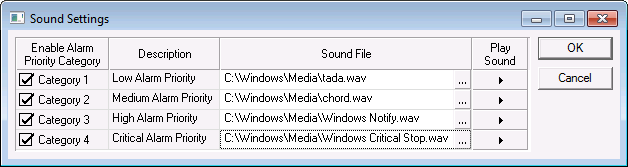
- Right-click in the alarm view and select Sound.
- Click the desired categories under Enable Alarm Priority Category.
- Use … to select the WAV file. From the Select File System dialog box, select either the Standard File System or the Blob File System, and click OK. Browse to the file and click Open.
- To play the sound, click on the arrow.
- When finished, click OK.
|
Alarm Sound Settings |